If you’re facing the issue of a non – working USB wall socket, you’re not alone. As a wall socket supplier, I’ve seen many customers grappling with this problem. In this blog, I’ll walk you through a series of steps to diagnose and potentially fix the problem. Wall Socket

Initial Checks
The first thing you need to do is perform some basic checks. Start by looking at the power source. Ensure that the wall outlet where your USB wall socket is plugged in is actually working. You can do this by plugging in another device, like a lamp or a phone charger. If the other device doesn’t work either, then the problem lies with the wall outlet. In this case, you may need to check the circuit breaker in your electrical panel. Sometimes, a tripped breaker can cut off power to a particular outlet. Locate the breaker that corresponds to the area where the USB wall socket is installed. If it’s in the "off" position, switch it back to "on".
If the wall outlet is working fine, then turn your attention to the USB wall socket itself. Examine the socket for any visible signs of damage, such as cracks, burns, or loose connections. A damaged socket can prevent it from functioning properly. If you notice any of these issues, it’s likely that the socket needs to be replaced.
USB Cable and Device Compatibility
Next, check the USB cable you’re using. A faulty cable can be the culprit behind a non – working USB wall socket. Try using a different USB cable to see if that solves the problem. Sometimes, the cable may be frayed or have a loose connection at the end. A new cable can often resolve the issue.
Also, consider the device you’re trying to charge. Some devices may have compatibility issues with certain USB wall sockets. For example, older devices may not be able to draw power from high – speed USB ports. Try using a different device to see if the problem persists. If a different device charges without any issues, then the problem may be with the original device.
Testing the USB Output
To further diagnose the problem, you can use a USB tester. A USB tester is a small device that can measure the voltage and current output of a USB port. Connect the USB tester to the USB wall socket. If the tester shows that there is no voltage or an abnormal voltage output, then the USB port in the wall socket may be defective.
Another way to test the USB output is by using a multimeter. Set the multimeter to measure DC voltage. Connect the probes of the multimeter to the positive and negative terminals of the USB port. A normal USB port should output around 5 volts. If the reading is significantly different from this, then there is an issue with the USB port.
Software and Firmware Issues
In some cases, the problem may be related to software or firmware. Some USB wall sockets have built – in chips that manage the power output. These chips may need to be updated to work properly. Check the manufacturer’s website to see if there are any available firmware updates for your USB wall socket.
To update the firmware, you may need to follow specific instructions provided by the manufacturer. This could involve connecting the socket to a computer and using a special software tool to perform the update. Make sure to back up any important data on your computer before attempting the update, as there is a small risk of data loss.
Contacting the Manufacturer
If you’ve tried all the above steps and the USB wall socket still isn’t working, it’s time to contact the manufacturer. Most manufacturers have a customer support team that can provide further assistance. You’ll need to provide them with detailed information about the problem, including when it started, what steps you’ve already taken to try and fix it, and any error messages you’ve received.
The manufacturer may be able to offer a replacement or a repair service. If your USB wall socket is still under warranty, they will likely cover the cost of these services. Keep in mind that the warranty terms can vary, so make sure to check the documentation that came with the socket.
Preventive Measures
To avoid future problems with your USB wall sockets, there are some preventive measures you can take. First, make sure to use high – quality USB cables. Cheap cables may not be as reliable and can cause issues over time. Also, avoid overloading the USB ports. Each port has a maximum power output, and exceeding this limit can damage the socket or the connected device.
Regularly inspect your USB wall sockets for any signs of wear and tear. If you notice any issues, address them immediately to prevent further damage.
Why Choose Our Wall Sockets
As a wall socket supplier, we take pride in offering high – quality products. Our USB wall sockets are designed with the latest technology to ensure reliable performance. We use only the best materials in the manufacturing process, which means our sockets are durable and long – lasting.
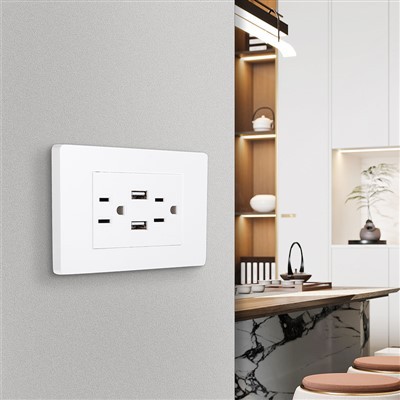
Our sockets undergo rigorous testing to meet industry standards. We have a team of experts who are constantly working on improving our products. Whether you’re looking for a single USB wall socket for your home or a large quantity for a commercial project, we can provide you with the right solution.
3 Way Switch If you’re interested in purchasing our wall sockets or have any questions about our products, we’d love to hear from you. Contact us to start a conversation about your requirements. Our sales team is ready to assist you in finding the perfect wall sockets for your needs.
References
- Electrical safety guidelines provided by local electrical authorities.
- Manufacturer’s documentation for USB wall sockets.
- Industry standards for USB power output.
Jiaxing Guanyuan Power Equipment Co., Ltd
As one of the most professional wall socket manufacturers and suppliers in China, we’re featured by quality products and good service. Please rest assured to wholesale cheap wall socket from our factory.
Address: Room 310, 3rd Floor, E-Commerce Center, Xindai Town, Pinghu County, Jiaxing City, Zhejiang Province, China
E-mail: alan@gyswitch.com
WebSite: https://www.gyswitch.com/
